> ## Documentation Index
> Fetch the complete documentation index at: https://developers.lighton.ai/llms.txt
> Use this file to discover all available pages before exploring further.
# Asking questions
> Get a grounded, LLM-generated answer over your documents with the sources it used.
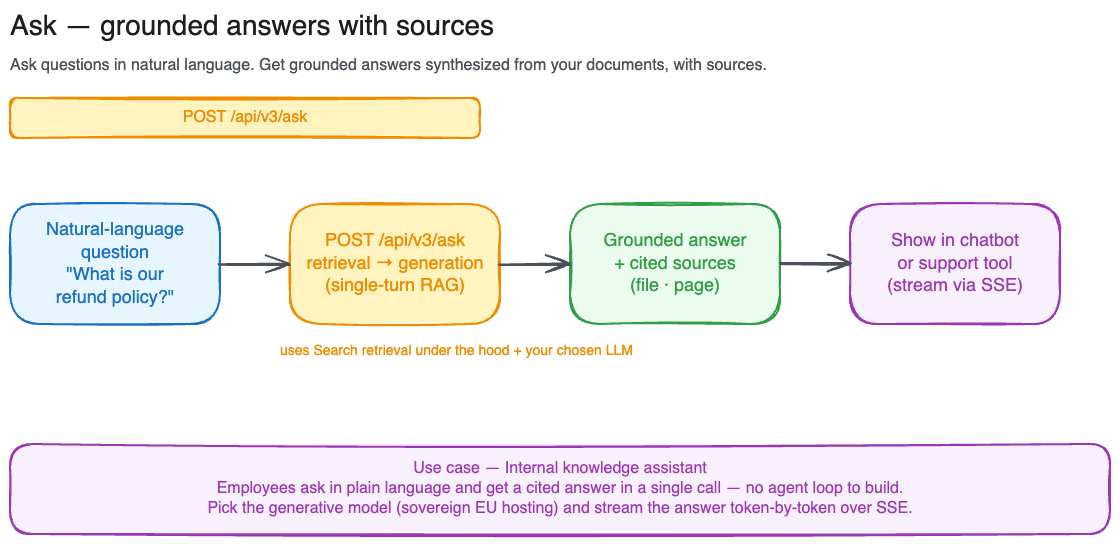 Ask is retrieval-augmented generation in a single call. It runs the same retrieval pipeline as [Search](/tutorials/search), then passes the retrieved passages to an LLM that writes a natural-language answer grounded in them, and hands back both the answer and the sources it drew from.
Use Ask when you want a direct answer to a question. Use [Search](/tutorials/search) when you want the raw passages and intend to do your own ranking, display, or generation on top of them.
Ask is intended for **basic, single-turn question answering**. It runs one retrieval and one generation with a fixed prompt and no tool use, memory, or follow-up reasoning. For advanced RAG (multi-step retrieval, query rewriting, conversational context, custom prompts, or your own choice of model), call [`POST /api/v3/search`](/tutorials/search) directly and drive generation from within your own agentic loop.
This tutorial walks through [`POST /api/v3/ask`](/api-reference/ask/ask-a-question-over-your-documents). For the full schema and every parameter, see the [API reference](/api-reference/introduction). Each request costs one search-with-generation credit.
## Your first question
```python theme={null}
import requests
response = requests.post(
"https://api.lighton.ai/api/v3/ask",
headers={"Authorization": "Bearer $LIGHTON_API_KEY"},
json={"query": "What is our JWT token expiry policy?"},
)
body = response.json()
print(body["answer"])
for result in body["results"]:
print(f" ↳ {result['source']['filename']}, p.{result['source']['page_start']}")
```
By default this searches every document your API key can reach, retrieves the top 10 passages, and generates an answer with the flagship model. The query is capped at 1500 characters.
## Reading the response
The response has two fields:
* **`answer`**: the LLM-generated answer, grounded in the retrieved passages.
* **`results`**: the ranked chunks used as context, in the same shape as a [Search](/tutorials/search#reading-the-response) result (`chunk_id`, `content`, `score`, `scores`, `source`, `workspace`). Use these to show citations or let users open the source document.
```json theme={null}
{
"results": [
{
"chunk_id": "550e8400-e29b-41d4-a716-446655440000",
"content": "JWT tokens are signed using RS256 and expire after 1 hour.",
"score": 0.87,
"scores": {
"text": 0.91,
"vision": null,
"keyword": 0.43,
"multivector": 12.4,
"relevance": 0.95
},
"source": {
"file_id": 512,
"filename": "auth-system.pdf",
"title": "Authentication System Design",
"mime_type": "pdf",
"size_bytes": 482113,
"page_start": 3,
"page_end": 4,
"total_pages": 12,
"tags": [{"id": 7, "name": "security"}],
"external_metadata": null
},
"workspace": {"id": 42, "name": "Engineering Docs"}
}
],
"answer": "JWT tokens are signed using RS256 and expire after 1 hour (auth-system.pdf, page 3)."
}
```
## Scoping to a subset of documents
Ask uses the same scoping rules as Search. Pass `workspace_id` and/or `tag_id` to narrow the corpus, or `file_id` to target specific files. `file_id` is mutually exclusive with `workspace_id` and `tag_id`.
```python theme={null}
json={
"query": "What are the GDPR data retention requirements?",
"tag_id": [7],
}
```
`max_results` (default 10, range 1 to 50) controls how many passages are retrieved and fed to the model as context. More context can improve answer quality on broad questions, at the cost of latency.
## Choosing a model
Two models are supported. Any other value is rejected with a `422`.
| `model` | Description |
| ---------------------------------- | -------------------------------------------------------------------- |
| `mistral-large-latest` *(default)* | Mistral Large 2, flagship, best answer quality. |
| `alfred-ft5` | LightOn fine-tune, lighter and faster for straightforward questions. |
```python theme={null}
json={
"query": "Summarize the incident response playbook.",
"model": "alfred-ft5",
}
```
## Streaming the answer
For chat-style UIs where you want to show the answer as it's written, set `stream: true`. The response is a stream of [Server-Sent Events](https://developer.mozilla.org/en-US/docs/Web/API/Server-sent_events) instead of a single JSON body:
| Event | Payload |
| --------- | --------------------------------------------------------------------- |
| `sources` | The retrieved chunks (same shape as `results`), emitted first. |
| `token` | An incremental piece of the answer. Many of these arrive in sequence. |
| `done` | The stream is complete. |
| `error` | Generation failed; the stream ends. |
```python theme={null}
import json
import requests
with requests.post(
"https://api.lighton.ai/api/v3/ask",
headers={"Authorization": "Bearer $LIGHTON_API_KEY"},
json={"query": "What is our JWT token expiry policy?", "stream": True},
stream=True,
) as response:
event = None
for line in response.iter_lines(decode_unicode=True):
if not line:
continue
if line.startswith("event:"):
event = line[len("event:"):].strip()
elif line.startswith("data:"):
data = json.loads(line[len("data:"):].strip())
if event == "sources":
sources = data # retrieved chunks, arrive once up front
elif event == "token":
print(data, end="", flush=True) # stream answer to the UI
elif event == "error":
raise RuntimeError(data)
```
Sources arrive first so you can render citations before the answer starts streaming. Stop reading once you receive the `done` event.
## Common errors
| Status | Cause |
| ------ | ---------------------------------------------------------------------------------------------- |
| `400` | Request body is not parsable JSON |
| `403` | None of the provided filters resolve to authorized resources |
| `422` | Validation error, e.g. unsupported `model`, or `file_id` combined with `workspace_id`/`tag_id` |
| `429` | Rate limit exceeded |
| `404` | A supported model is not currently available on the backend |
| `503` | Model temporarily unavailable. Retry later |
| `504` | Model did not respond in time. Retry later |
Ask is retrieval-augmented generation in a single call. It runs the same retrieval pipeline as [Search](/tutorials/search), then passes the retrieved passages to an LLM that writes a natural-language answer grounded in them, and hands back both the answer and the sources it drew from.
Use Ask when you want a direct answer to a question. Use [Search](/tutorials/search) when you want the raw passages and intend to do your own ranking, display, or generation on top of them.
Ask is intended for **basic, single-turn question answering**. It runs one retrieval and one generation with a fixed prompt and no tool use, memory, or follow-up reasoning. For advanced RAG (multi-step retrieval, query rewriting, conversational context, custom prompts, or your own choice of model), call [`POST /api/v3/search`](/tutorials/search) directly and drive generation from within your own agentic loop.
This tutorial walks through [`POST /api/v3/ask`](/api-reference/ask/ask-a-question-over-your-documents). For the full schema and every parameter, see the [API reference](/api-reference/introduction). Each request costs one search-with-generation credit.
## Your first question
```python theme={null}
import requests
response = requests.post(
"https://api.lighton.ai/api/v3/ask",
headers={"Authorization": "Bearer $LIGHTON_API_KEY"},
json={"query": "What is our JWT token expiry policy?"},
)
body = response.json()
print(body["answer"])
for result in body["results"]:
print(f" ↳ {result['source']['filename']}, p.{result['source']['page_start']}")
```
By default this searches every document your API key can reach, retrieves the top 10 passages, and generates an answer with the flagship model. The query is capped at 1500 characters.
## Reading the response
The response has two fields:
* **`answer`**: the LLM-generated answer, grounded in the retrieved passages.
* **`results`**: the ranked chunks used as context, in the same shape as a [Search](/tutorials/search#reading-the-response) result (`chunk_id`, `content`, `score`, `scores`, `source`, `workspace`). Use these to show citations or let users open the source document.
```json theme={null}
{
"results": [
{
"chunk_id": "550e8400-e29b-41d4-a716-446655440000",
"content": "JWT tokens are signed using RS256 and expire after 1 hour.",
"score": 0.87,
"scores": {
"text": 0.91,
"vision": null,
"keyword": 0.43,
"multivector": 12.4,
"relevance": 0.95
},
"source": {
"file_id": 512,
"filename": "auth-system.pdf",
"title": "Authentication System Design",
"mime_type": "pdf",
"size_bytes": 482113,
"page_start": 3,
"page_end": 4,
"total_pages": 12,
"tags": [{"id": 7, "name": "security"}],
"external_metadata": null
},
"workspace": {"id": 42, "name": "Engineering Docs"}
}
],
"answer": "JWT tokens are signed using RS256 and expire after 1 hour (auth-system.pdf, page 3)."
}
```
## Scoping to a subset of documents
Ask uses the same scoping rules as Search. Pass `workspace_id` and/or `tag_id` to narrow the corpus, or `file_id` to target specific files. `file_id` is mutually exclusive with `workspace_id` and `tag_id`.
```python theme={null}
json={
"query": "What are the GDPR data retention requirements?",
"tag_id": [7],
}
```
`max_results` (default 10, range 1 to 50) controls how many passages are retrieved and fed to the model as context. More context can improve answer quality on broad questions, at the cost of latency.
## Choosing a model
Two models are supported. Any other value is rejected with a `422`.
| `model` | Description |
| ---------------------------------- | -------------------------------------------------------------------- |
| `mistral-large-latest` *(default)* | Mistral Large 2, flagship, best answer quality. |
| `alfred-ft5` | LightOn fine-tune, lighter and faster for straightforward questions. |
```python theme={null}
json={
"query": "Summarize the incident response playbook.",
"model": "alfred-ft5",
}
```
## Streaming the answer
For chat-style UIs where you want to show the answer as it's written, set `stream: true`. The response is a stream of [Server-Sent Events](https://developer.mozilla.org/en-US/docs/Web/API/Server-sent_events) instead of a single JSON body:
| Event | Payload |
| --------- | --------------------------------------------------------------------- |
| `sources` | The retrieved chunks (same shape as `results`), emitted first. |
| `token` | An incremental piece of the answer. Many of these arrive in sequence. |
| `done` | The stream is complete. |
| `error` | Generation failed; the stream ends. |
```python theme={null}
import json
import requests
with requests.post(
"https://api.lighton.ai/api/v3/ask",
headers={"Authorization": "Bearer $LIGHTON_API_KEY"},
json={"query": "What is our JWT token expiry policy?", "stream": True},
stream=True,
) as response:
event = None
for line in response.iter_lines(decode_unicode=True):
if not line:
continue
if line.startswith("event:"):
event = line[len("event:"):].strip()
elif line.startswith("data:"):
data = json.loads(line[len("data:"):].strip())
if event == "sources":
sources = data # retrieved chunks, arrive once up front
elif event == "token":
print(data, end="", flush=True) # stream answer to the UI
elif event == "error":
raise RuntimeError(data)
```
Sources arrive first so you can render citations before the answer starts streaming. Stop reading once you receive the `done` event.
## Common errors
| Status | Cause |
| ------ | ---------------------------------------------------------------------------------------------- |
| `400` | Request body is not parsable JSON |
| `403` | None of the provided filters resolve to authorized resources |
| `422` | Validation error, e.g. unsupported `model`, or `file_id` combined with `workspace_id`/`tag_id` |
| `429` | Rate limit exceeded |
| `404` | A supported model is not currently available on the backend |
| `503` | Model temporarily unavailable. Retry later |
| `504` | Model did not respond in time. Retry later |