> ## Documentation Index
> Fetch the complete documentation index at: https://developers.lighton.ai/llms.txt
> Use this file to discover all available pages before exploring further.
# Extracting structured data
> Pull typed fields out of documents using a JSON Schema you provide.
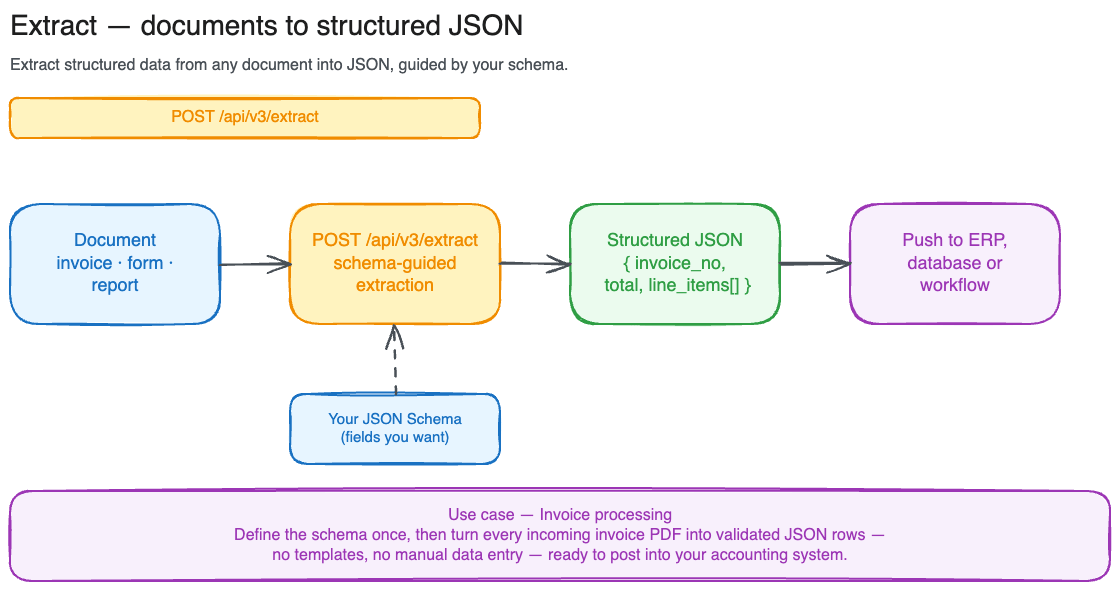 Extract takes a document and a JSON Schema, and returns the fields described by the schema as a structured object. You define what you want in the schema, the API finds it in the document: invoices, forms, ID documents, contracts, anything.
By default the call is **synchronous**: you send the request, the API blocks until the extraction is done, and the response comes back with the full result. For larger documents, opt into **async mode** with `options.async = true`: you get back a job ID, and you poll until done.
Full request/response schema for [`POST /api/v3/extract`](/api-reference/extract/extract-structured-data-from-a-document) and [`GET /api/v3/extract/{job_id}`](/api-reference/extract/get-extract-job-status) lives in the [API reference](/api-reference/introduction).
## When to use Extract
| | Input | Output | Best for |
| ----------- | ---------------------- | ------------------ | ---------------------------------------------------- |
| **Search** | Query string | Ranked text chunks | Finding passages across many documents |
| **Parse** | Document file | Markdown text | Converting a document to clean text |
| **Extract** | Document + JSON Schema | Structured object | Pulling typed fields from forms, invoices, contracts |
Use Extract when you need machine-readable values out of a document, mapped to fields you've named.
Extract applies your schema **independently to every page** of the document: `result.data` comes back with one object per page. That makes it ideal for **mechanical, repetitive document processing**, where each page is a self-contained record (a stack of invoices, a batch of forms, a multi-page table) and you want the same fields pulled from every one.
If instead you need a **single structured JSON for the whole document** (synthesizing information spread across pages into one consolidated object), Extract is the wrong tool. Use the [`POST /api/v3/search`](/tutorials/search) endpoint inside your own agentic loop to retrieve the relevant passages, then have your model generate the structured output from them.
## Sync extraction (small documents)
Sync mode handles documents up to **20 MB, 15 pages** and returns the full result in one response.
```python theme={null}
import requests
headers = {"Authorization": "Bearer $LIGHTON_API_KEY"}
response = requests.post(
"https://api.lighton.ai/api/v3/extract",
headers=headers,
json={
"document": "https://example.com/invoices/inv-2025-004.pdf",
"schema": {
"type": "object",
"properties": {
"invoice_number": {"type": "string", "description": "The invoice reference number"},
"total": {"type": "number", "description": "The total amount due"},
"due_date": {"type": "string", "description": "Due date in ISO format"},
},
},
},
)
result = response.json()
print(result["status"]) # → completed
print(result["result"]["data"]) # → [{"invoice_number": "INV-2025-004", "total": 4750.0, "due_date": "2025-12-01"}, ...]
```
You can also send a file via `multipart/form-data` instead of a URL:
```python theme={null}
requests.post(
"https://api.lighton.ai/api/v3/extract",
headers=headers,
files={"file": open("invoice.pdf", "rb")},
data={"schema": '{"type": "object", "properties": {"invoice_number": {"type": "string"}}}'},
)
```
In multipart requests, `schema` arrives as a JSON-encoded string and is decoded server-side.
## Async extraction (large documents)
For documents up to **100 MB, 1000 pages**, set `options.async = true`. The API returns a `202 Accepted` immediately with a job ID.
```python theme={null}
response = requests.post(
"https://api.lighton.ai/api/v3/extract",
headers=headers,
json={
"document": "https://example.com/large-report.pdf",
"schema": {"type": "object", "properties": {"title": {"type": "string"}}},
"options": {"async": True},
},
)
job_id = response.json()["id"]
print(job_id)
# → ext_0196e4b2a3c14d5e8f7a9b2c1d0e3f4a
```
Poll [`GET /api/v3/extract/{job_id}`](/api-reference/extract/get-extract-job-status) until `status` is `completed` or `failed`. Recommended cadence: 1 s for the first 10 s, then 5 s, capped at 30 s.
```python theme={null}
import time
while True:
r = requests.get(
f"https://api.lighton.ai/api/v3/extract/{job_id}",
headers=headers,
)
data = r.json()
if data["status"] in ("completed", "failed"):
break
time.sleep(2)
print(data["result"]["data"])
```
## Reading the response
Sync and async responses share the same shape:
```json theme={null}
{
"id": "ext_0196e4b2a3c14d5e8f7a9b2c1d0e3f4a",
"status": "completed",
"created_at": "2026-03-31T10:00:00+00:00",
"completed_at": "2026-03-31T10:00:04+00:00",
"processing_time_ms": 3200,
"document": {
"filename": "invoice.pdf",
"page_count": 3,
"file_size_bytes": 245120,
"mime_type": "application/pdf"
},
"result": {
"data": [
{"invoice_number": "INV-2026-001", "total": null},
{"invoice_number": null, "total": 1250.00}
],
"pagination": {
"page": 1,
"page_size": 15,
"total_items": 3,
"total_pages": 1,
"has_next": false,
"has_prev": false
}
},
"usage": {
"pages_processed": 3
}
}
```
`result.data` is one entry per page, each shaped like your schema. Fields that weren't found on a given page are `null`. When the document has more than 15 pages, `result.data` is paginated: request additional pages with `?page=N` on the [`GET /api/v3/extract/{job_id}`](/api-reference/extract/get-extract-job-status) endpoint.
## Common errors
| Status | Cause |
| ------ | ---------------------------------------------------------------------- |
| `400` | Missing document/file, unsupported format, or page limit exceeded |
| `401` | Missing or invalid API key |
| `404` | Extract job not found |
| `413` | File exceeds the size limit (20 MB sync, 100 MB async) |
| `422` | JSON Schema is malformed, uses unsupported features, or exceeds limits |
| `429` | Rate limit exceeded (6 requests/second per tenant) |
| `503` | Parsing backend is overloaded. Retry later |
Extract takes a document and a JSON Schema, and returns the fields described by the schema as a structured object. You define what you want in the schema, the API finds it in the document: invoices, forms, ID documents, contracts, anything.
By default the call is **synchronous**: you send the request, the API blocks until the extraction is done, and the response comes back with the full result. For larger documents, opt into **async mode** with `options.async = true`: you get back a job ID, and you poll until done.
Full request/response schema for [`POST /api/v3/extract`](/api-reference/extract/extract-structured-data-from-a-document) and [`GET /api/v3/extract/{job_id}`](/api-reference/extract/get-extract-job-status) lives in the [API reference](/api-reference/introduction).
## When to use Extract
| | Input | Output | Best for |
| ----------- | ---------------------- | ------------------ | ---------------------------------------------------- |
| **Search** | Query string | Ranked text chunks | Finding passages across many documents |
| **Parse** | Document file | Markdown text | Converting a document to clean text |
| **Extract** | Document + JSON Schema | Structured object | Pulling typed fields from forms, invoices, contracts |
Use Extract when you need machine-readable values out of a document, mapped to fields you've named.
Extract applies your schema **independently to every page** of the document: `result.data` comes back with one object per page. That makes it ideal for **mechanical, repetitive document processing**, where each page is a self-contained record (a stack of invoices, a batch of forms, a multi-page table) and you want the same fields pulled from every one.
If instead you need a **single structured JSON for the whole document** (synthesizing information spread across pages into one consolidated object), Extract is the wrong tool. Use the [`POST /api/v3/search`](/tutorials/search) endpoint inside your own agentic loop to retrieve the relevant passages, then have your model generate the structured output from them.
## Sync extraction (small documents)
Sync mode handles documents up to **20 MB, 15 pages** and returns the full result in one response.
```python theme={null}
import requests
headers = {"Authorization": "Bearer $LIGHTON_API_KEY"}
response = requests.post(
"https://api.lighton.ai/api/v3/extract",
headers=headers,
json={
"document": "https://example.com/invoices/inv-2025-004.pdf",
"schema": {
"type": "object",
"properties": {
"invoice_number": {"type": "string", "description": "The invoice reference number"},
"total": {"type": "number", "description": "The total amount due"},
"due_date": {"type": "string", "description": "Due date in ISO format"},
},
},
},
)
result = response.json()
print(result["status"]) # → completed
print(result["result"]["data"]) # → [{"invoice_number": "INV-2025-004", "total": 4750.0, "due_date": "2025-12-01"}, ...]
```
You can also send a file via `multipart/form-data` instead of a URL:
```python theme={null}
requests.post(
"https://api.lighton.ai/api/v3/extract",
headers=headers,
files={"file": open("invoice.pdf", "rb")},
data={"schema": '{"type": "object", "properties": {"invoice_number": {"type": "string"}}}'},
)
```
In multipart requests, `schema` arrives as a JSON-encoded string and is decoded server-side.
## Async extraction (large documents)
For documents up to **100 MB, 1000 pages**, set `options.async = true`. The API returns a `202 Accepted` immediately with a job ID.
```python theme={null}
response = requests.post(
"https://api.lighton.ai/api/v3/extract",
headers=headers,
json={
"document": "https://example.com/large-report.pdf",
"schema": {"type": "object", "properties": {"title": {"type": "string"}}},
"options": {"async": True},
},
)
job_id = response.json()["id"]
print(job_id)
# → ext_0196e4b2a3c14d5e8f7a9b2c1d0e3f4a
```
Poll [`GET /api/v3/extract/{job_id}`](/api-reference/extract/get-extract-job-status) until `status` is `completed` or `failed`. Recommended cadence: 1 s for the first 10 s, then 5 s, capped at 30 s.
```python theme={null}
import time
while True:
r = requests.get(
f"https://api.lighton.ai/api/v3/extract/{job_id}",
headers=headers,
)
data = r.json()
if data["status"] in ("completed", "failed"):
break
time.sleep(2)
print(data["result"]["data"])
```
## Reading the response
Sync and async responses share the same shape:
```json theme={null}
{
"id": "ext_0196e4b2a3c14d5e8f7a9b2c1d0e3f4a",
"status": "completed",
"created_at": "2026-03-31T10:00:00+00:00",
"completed_at": "2026-03-31T10:00:04+00:00",
"processing_time_ms": 3200,
"document": {
"filename": "invoice.pdf",
"page_count": 3,
"file_size_bytes": 245120,
"mime_type": "application/pdf"
},
"result": {
"data": [
{"invoice_number": "INV-2026-001", "total": null},
{"invoice_number": null, "total": 1250.00}
],
"pagination": {
"page": 1,
"page_size": 15,
"total_items": 3,
"total_pages": 1,
"has_next": false,
"has_prev": false
}
},
"usage": {
"pages_processed": 3
}
}
```
`result.data` is one entry per page, each shaped like your schema. Fields that weren't found on a given page are `null`. When the document has more than 15 pages, `result.data` is paginated: request additional pages with `?page=N` on the [`GET /api/v3/extract/{job_id}`](/api-reference/extract/get-extract-job-status) endpoint.
## Common errors
| Status | Cause |
| ------ | ---------------------------------------------------------------------- |
| `400` | Missing document/file, unsupported format, or page limit exceeded |
| `401` | Missing or invalid API key |
| `404` | Extract job not found |
| `413` | File exceeds the size limit (20 MB sync, 100 MB async) |
| `422` | JSON Schema is malformed, uses unsupported features, or exceeds limits |
| `429` | Rate limit exceeded (6 requests/second per tenant) |
| `503` | Parsing backend is overloaded. Retry later |