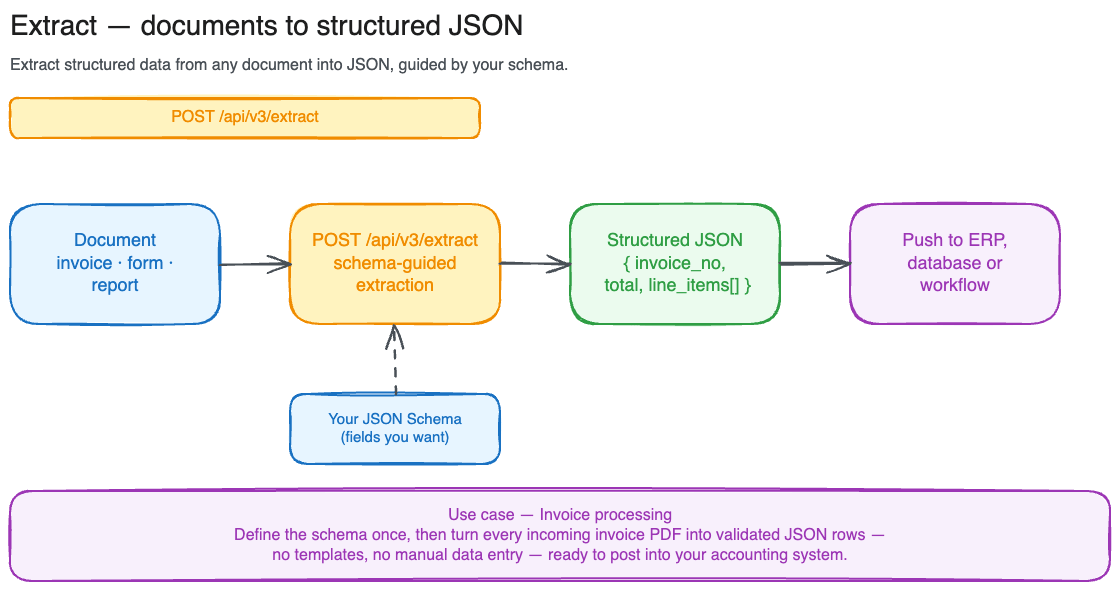
Illustration of the Extract use case.
Extract takes a document and a JSON Schema, and returns the fields described by the schema as a structured object. You define what you want in the schema, the API finds it in the document: invoices, forms, ID documents, contracts, anything. By default the call is synchronous: you send the request, the API blocks until the extraction is done, and the response comes back with the full result. For larger documents, opt into async mode with options.async = true: you get back a job ID, and you poll until done.
Full request/response schema for POST /api/v3/extract and GET /api/v3/extract/{job_id} lives in the API reference.

When to use Extract

InputOutputBest for
SearchQuery stringRanked text chunksFinding passages across many documents
ParseDocument fileMarkdown textConverting a document to clean text
ExtractDocument + JSON SchemaStructured objectPulling typed fields from forms, invoices, contracts
Use Extract when you need machine-readable values out of a document, mapped to fields you’ve named.
Extract applies your schema independently to every page of the document: result.data comes back with one object per page. That makes it ideal for mechanical, repetitive document processing, where each page is a self-contained record (a stack of invoices, a batch of forms, a multi-page table) and you want the same fields pulled from every one.If instead you need a single structured JSON for the whole document (synthesizing information spread across pages into one consolidated object), Extract is the wrong tool. Use the POST /api/v3/search endpoint inside your own agentic loop to retrieve the relevant passages, then have your model generate the structured output from them.

Sync extraction (small documents)

Sync mode handles documents up to 20 MB, 15 pages and returns the full result in one response.
import requests

headers = {"Authorization": "Bearer $LIGHTON_API_KEY"}

response = requests.post(
    "https://api.lighton.ai/api/v3/extract",
    headers=headers,
    json={
        "document": "https://example.com/invoices/inv-2025-004.pdf",
        "schema": {
            "type": "object",
            "properties": {
                "invoice_number": {"type": "string", "description": "The invoice reference number"},
                "total":          {"type": "number", "description": "The total amount due"},
                "due_date":       {"type": "string", "description": "Due date in ISO format"},
            },
        },
    },
)

result = response.json()
print(result["status"])              # → completed
print(result["result"]["data"])      # → [{"invoice_number": "INV-2025-004", "total": 4750.0, "due_date": "2025-12-01"}, ...]
You can also send a file via multipart/form-data instead of a URL:
requests.post(
    "https://api.lighton.ai/api/v3/extract",
    headers=headers,
    files={"file": open("invoice.pdf", "rb")},
    data={"schema": '{"type": "object", "properties": {"invoice_number": {"type": "string"}}}'},
)
In multipart requests, schema arrives as a JSON-encoded string and is decoded server-side.

Async extraction (large documents)

For documents up to 100 MB, 1000 pages, set options.async = true. The API returns a 202 Accepted immediately with a job ID.
response = requests.post(
    "https://api.lighton.ai/api/v3/extract",
    headers=headers,
    json={
        "document": "https://example.com/large-report.pdf",
        "schema": {"type": "object", "properties": {"title": {"type": "string"}}},
        "options": {"async": True},
    },
)

job_id = response.json()["id"]
print(job_id)
# → ext_0196e4b2a3c14d5e8f7a9b2c1d0e3f4a
Poll GET /api/v3/extract/{job_id} until status is completed or failed. Recommended cadence: 1 s for the first 10 s, then 5 s, capped at 30 s.
import time

while True:
    r = requests.get(
        f"https://api.lighton.ai/api/v3/extract/{job_id}",
        headers=headers,
    )
    data = r.json()
    if data["status"] in ("completed", "failed"):
        break
    time.sleep(2)

print(data["result"]["data"])

Reading the response

Sync and async responses share the same shape:
{
  "id": "ext_0196e4b2a3c14d5e8f7a9b2c1d0e3f4a",
  "status": "completed",
  "created_at": "2026-03-31T10:00:00+00:00",
  "completed_at": "2026-03-31T10:00:04+00:00",
  "processing_time_ms": 3200,
  "document": {
    "filename": "invoice.pdf",
    "page_count": 3,
    "file_size_bytes": 245120,
    "mime_type": "application/pdf"
  },
  "result": {
    "data": [
      {"invoice_number": "INV-2026-001", "total": null},
      {"invoice_number": null,           "total": 1250.00}
    ],
    "pagination": {
      "page": 1,
      "page_size": 15,
      "total_items": 3,
      "total_pages": 1,
      "has_next": false,
      "has_prev": false
    }
  },
  "usage": {
    "pages_processed": 3
  }
}
result.data is one entry per page, each shaped like your schema. Fields that weren’t found on a given page are null. When the document has more than 15 pages, result.data is paginated: request additional pages with ?page=N on the GET /api/v3/extract/{job_id} endpoint.

Common errors

StatusCause
400Missing document/file, unsupported format, or page limit exceeded
401Missing or invalid API key
404Extract job not found
413File exceeds the size limit (20 MB sync, 100 MB async)
422JSON Schema is malformed, uses unsupported features, or exceeds limits
429Rate limit exceeded (6 requests/second per tenant)
503Parsing backend is overloaded. Retry later