

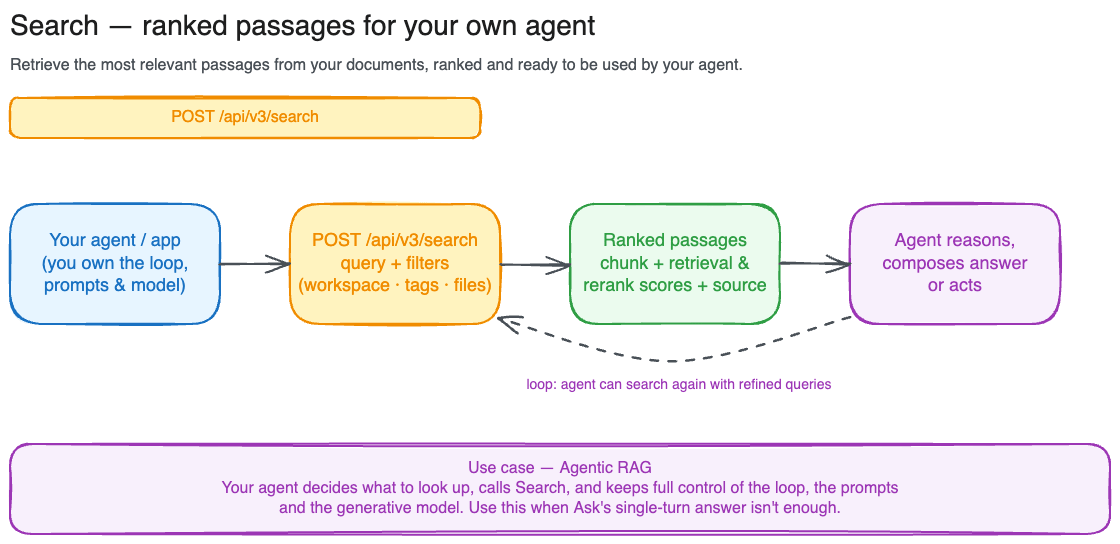
Your first search
If you’ve already uploaded documents, this is all you need:Scoping to a subset of documents
When you want to limit search to a specific team’s workspace, a handful of files, or a tagged collection, use one of the three scoping parameters.file_id is mutually exclusive with workspace_id and tag_id, while workspace_id and tag_id can be combined.
- By workspace
- By file
- By tag
Best for multi-tenant products where each customer or team has their own workspace.
Reading the response
Each result contains:content: the matched passage text.nullfor vision-mode chunks.score: the relevance score you rank on. With scoring on (the default), it equalsscores.relevance(0–1); with scoring off, it’s the combined retrieval score (unbounded).scores: the per-signal breakdown behind that score. See Understanding the scores below.source: where the chunk came from:file_id,filename,title,mime_type,size_bytes,page_start/page_end,total_pages,tags, andexternal_metadatafor connector-imported files.workspace: the workspace the document belongs to.
Understanding the scores
score is the single number you should rank and threshold on, and results come back ordered by it, descending. When relevance scoring runs (the default), score is the cross-encoder relevance score (scores.relevance, 0–1). When you turn scoring off with relevance_scoring: none, score falls back to the combined retrieval score (unbounded, higher is better). Use it directly unless you have a reason to inspect the parts.
scores exposes those individual signals so you can debug why a chunk ranked where it did, or build your own re-ranking on top. Each signal is null when it didn’t apply to that chunk.
A signal can also read
null because it failed, not because it didn’t apply. When that happens the result item carries a warnings array: each entry has a code naming the degraded signal (relevance, multivector, or vision) and a reason (model_not_found, embed_failed, timeout, service_error, or unknown). Results are still returned, in retrieval order when the reranker is the signal that degraded, but ranking quality is lower. A null with no matching warning just means the signal doesn’t apply to that chunk, and warnings is absent entirely when every step succeeded.
Only
text, keyword, and multivector share a comparable footing within a single response; relevance is a calibrated probability and vision lives on its own scale. Don’t compare raw signal values against each other or across queries — for ranking, always use the top-level score.Tuning result count and latency
max_results (default 10, range 1–100) controls how many ranked chunks come back.
For lower latency, set relevance_scoring: "none". You lose the reranker’s quality boost but the pipeline becomes a straight hybrid lookup: results come back in retrieval order, score is the combined retrieval score, and scores.relevance will be null.
relevance_scoring also accepts scoring_only (score every candidate but return them all, without filtering below the quality threshold). Omit it for the default (scoring_and_filtering). The old skip_rerank flag is deprecated: true maps to none, false to scoring_and_filtering.
Searching images and diagrams
Switch to vision mode to search documents by their visual content, useful for scanned pages, slide decks, architecture diagrams, or any document where the meaning is in the layout rather than the words.status_vision: "embedded"). With include_image: true, each result includes an image.b64_content field with the page rendered as a base64 image. In text mode, the image is fetched from the vision chunk covering the chunk’s start page, or an empty string if no vision index exists for that page.
Narrowing search with metadata filters
If your documents are classified with Facets, addcontent_type and attribute fields to the request body to scope results by metadata. See Filtering by facets for worked examples.