The two halves of RAG
RAG combines two very different kinds of models. Understanding the split is the key to using the API well.Retrieval models
Given a query, they find the most relevant pieces of text in a corpus. They don’t write anything, they rank existing passages by how well they match the meaning of the query. Fast, factual, and grounded in your actual documents.
Generative models
Given a prompt, they write new text, fluent, coherent, in natural language. On their own they have no access to your data and can hallucinate. Their strength is synthesis and phrasing, not recall.
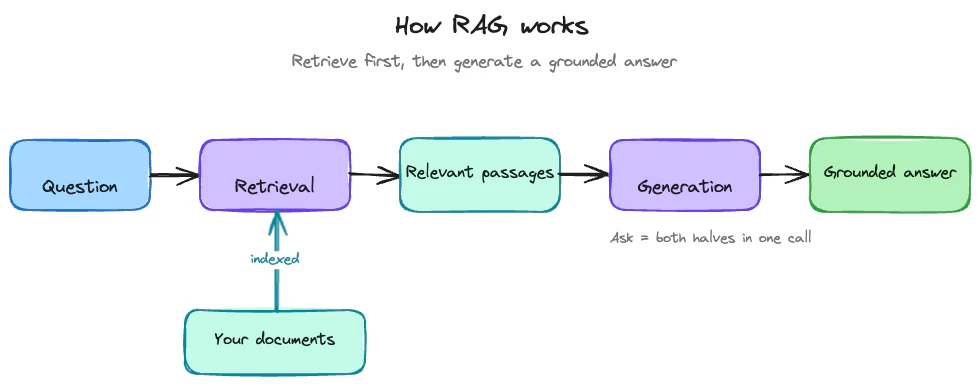
How retrieval works under the hood
When you ingest a document, LightOn turns it into a retrieval-ready index for you. Behind a single API call sits a full document-understanding pipeline: it reads the layout and structure of the document, breaks the content into meaningful units, builds rich semantic representations of them, and indexes everything for fast retrieval, with a lot of careful work in between to keep results accurate across messy, real-world files. You never have to run a vector database, an OCR model, or an embedding pipeline yourself. At query time, retrieval runs a hybrid lookup (vector search for meaning and lexical search for exact terms), then a reranker scores every candidate against the full query and returns the best passages.Mapping use cases to endpoints
LightOn exposes each piece of this stack as an endpoint, so you can use as much or as little of the RAG pattern as you need.Build a searchable knowledge base
Ingest documents once into a persistent, indexed corpus, then retrieve over it as often as you like.Files
Ingestion. Upload documents and LightOn turns them into a searchable index automatically, running the whole document-understanding pipeline for you. This is the “your documents” box in the diagram above.
Search
Retrieval only. Send a natural-language query, get back ranked passages with scores and sources. Use this when you want the raw material and intend to do your own ranking, display, or generation on top.
Ask
Retrieval + generation. Full RAG in a single call: it retrieves and generates a grounded answer with citations. The fastest path from question to cited answer.
- Reach for Ask for straightforward, single-turn question answering. One retrieval, one generation, with a fixed prompt: minimal code on your side.
- Reach for Search when you want to drive generation yourself: multi-step retrieval, query rewriting, conversational memory, custom prompts, or your own choice of model. Call
Searchinside your own agentic loop, then feed the passages to whatever generative model you prefer.
Process documents on the fly
Sometimes you don’t want a persistent corpus at all, you just want to turn one document into something machine-readable for your own pipeline. Nothing is stored.Parse
Document to clean Markdown. The parsing step from the ingestion pipeline, exposed on its own. Useful when you want to feed text to your own LLM, store it, or display it.
Extract
Document to typed fields. Give it a JSON Schema and it pulls those fields out of every page. Built for mechanical, repetitive processing: stacks of invoices, batches of forms.
Demystifying agentic RAG, it’s just a loop!
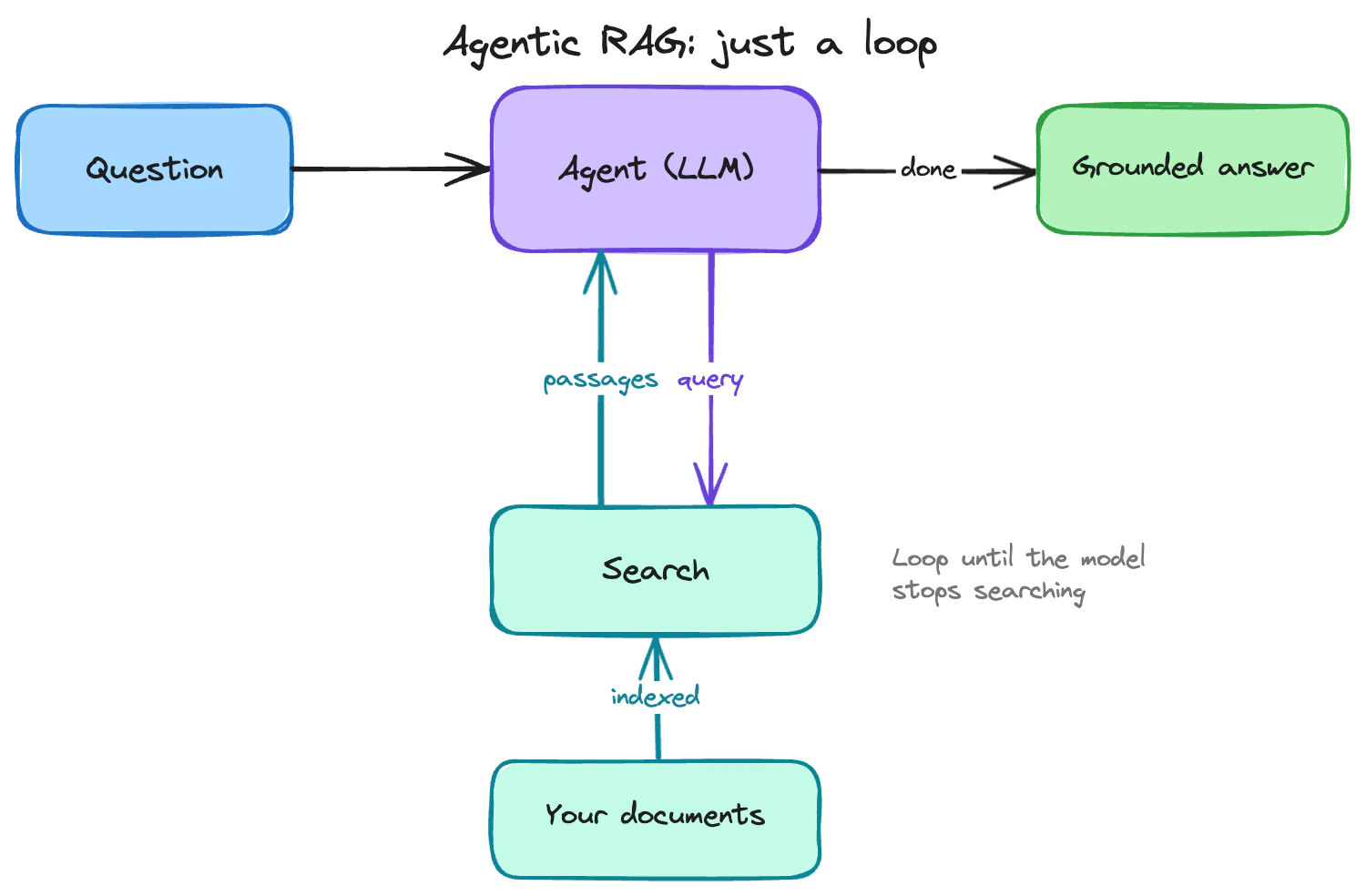
while loop where a model decides what to look up, reads what comes back, and chooses whether to search again or write the answer. Search is the only retrieval tool you need inside that loop.
Plain Ask runs one retrieval and one generation. That covers a direct question like “What is the JWT token expiry policy”. It falls short when a question needs several lookups, or when the right query only becomes clear after you’ve seen the first results. Take “How does our token expiry compare to the OAuth refresh window, and which one expires first?”. Answering it well means retrieving the token policy, separately retrieving the refresh window, then reasoning over both.
The loop has three moving parts:
- The model proposes a search query.
- You call Search and hand the passages back to the model.
- The model either proposes another query or decides it has enough to answer.
Ship your first RAG
Uploading & managing files
Build the corpus everything else retrieves over.
Searching documents
See retrieval in action and tune it to your needs.
Asking questions
Get a grounded, cited answer in one call.