Documentation Index
Fetch the complete documentation index at: https://developers.lighton.ai/llms.txt
Use this file to discover all available pages before exploring further.
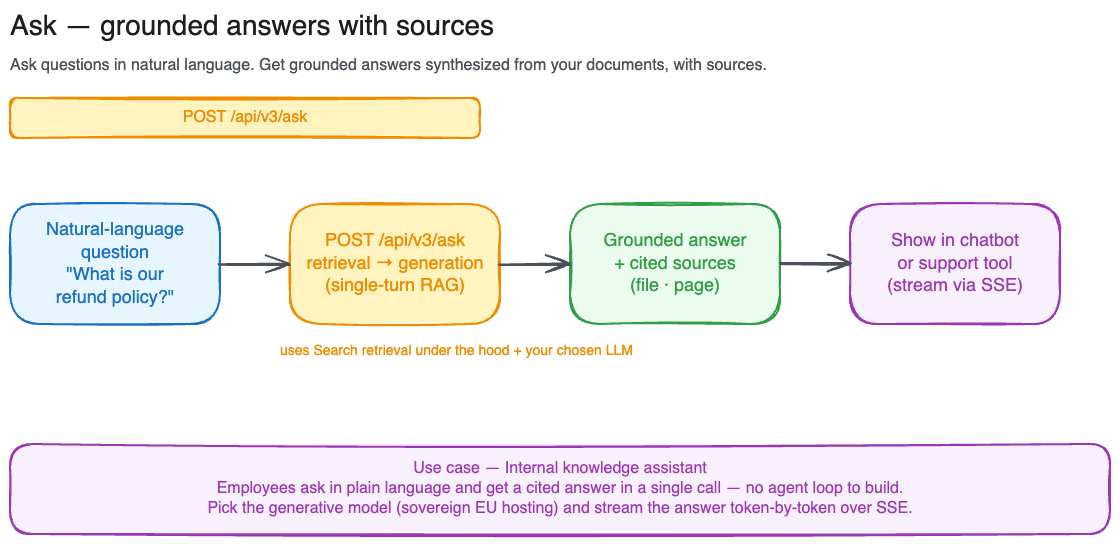
Ask is retrieval-augmented generation in a single call. It runs the same retrieval pipeline as Search, then passes the retrieved passages to an LLM that writes a natural-language answer grounded in them, and hands back both the answer and the sources it drew from.
Use Ask when you want a direct answer to a question. Use Search when you want the raw passages and intend to do your own ranking, display, or generation on top of them.
Ask is intended for basic, single-turn question answering. It runs one retrieval and one generation with a fixed prompt and no tool use, memory, or follow-up reasoning. For advanced RAG (multi-step retrieval, query rewriting, conversational context, custom prompts, or your own choice of model), call POST /api/v3/search directly and drive generation from within your own agentic loop.
This tutorial walks through POST /api/v3/ask. For the full schema and every parameter, see the API reference. Each request costs one search-with-generation credit.
Your first question
import requests
response = requests.post(
"https://api.lighton.ai/api/v3/ask",
headers={"Authorization": "Bearer $CONSOLE_API_KEY"},
json={"query": "What is our JWT token expiry policy?"},
)
body = response.json()
print(body["answer"])
for result in body["results"]:
print(f" ↳ {result['source']['filename']}, p.{result['source']['page_start']}")
By default this searches every document your API key can reach, retrieves the top 10 passages, and generates an answer with the flagship model. The query is capped at 1500 characters.
Reading the response
The response has two fields:
answer: the LLM-generated answer, grounded in the retrieved passages.
results: the ranked chunks used as context, in the same shape as a Search result (chunk_id, content, score, source, workspace). Use these to show citations or let users open the source document.
{
"results": [
{
"chunk_id": "550e8400-e29b-41d4-a716-446655440000",
"content": "JWT tokens are signed using RS256 and expire after 1 hour.",
"score": { "retrieval": 0.92, "reranking": 0.95 },
"source": {
"file_id": 512,
"filename": "auth-system.pdf",
"title": "Authentication System Design",
"mime_type": "pdf",
"size_bytes": 482113,
"page_start": 3,
"page_end": 4,
"total_pages": 12,
"tags": [{"id": 7, "name": "security"}],
"external_metadata": null
},
"workspace": {"id": 42, "name": "Engineering Docs"}
}
],
"answer": "JWT tokens are signed using RS256 and expire after 1 hour (auth-system.pdf, page 3)."
}
Scoping to a subset of documents
Ask uses the same scoping rules as Search. Pass workspace_id and/or tag_id to narrow the corpus, or file_id to target specific files. file_id is mutually exclusive with workspace_id and tag_id.
json={
"query": "What are the GDPR data retention requirements?",
"tag_id": [7],
}
max_results (default 10, range 1 to 50) controls how many passages are retrieved and fed to the model as context. More context can improve answer quality on broad questions, at the cost of latency.
Choosing a model
Two models are supported. Any other value is rejected with a 422.
model | Description |
|---|
mistral-large-latest (default) | Mistral Large 2, flagship, best answer quality. |
alfred-ft5 | LightOn fine-tune, lighter and faster for straightforward questions. |
json={
"query": "Summarize the incident response playbook.",
"model": "alfred-ft5",
}
Streaming the answer
For chat-style UIs where you want to show the answer as it’s written, set stream: true. The response is a stream of Server-Sent Events instead of a single JSON body:
| Event | Payload |
|---|
sources | The retrieved chunks (same shape as results), emitted first. |
token | An incremental piece of the answer. Many of these arrive in sequence. |
done | The stream is complete. |
error | Generation failed; the stream ends. |
import json
import requests
with requests.post(
"https://api.lighton.ai/api/v3/ask",
headers={"Authorization": "Bearer $CONSOLE_API_KEY"},
json={"query": "What is our JWT token expiry policy?", "stream": True},
stream=True,
) as response:
event = None
for line in response.iter_lines(decode_unicode=True):
if not line:
continue
if line.startswith("event:"):
event = line[len("event:"):].strip()
elif line.startswith("data:"):
data = json.loads(line[len("data:"):].strip())
if event == "sources":
sources = data # retrieved chunks, arrive once up front
elif event == "token":
print(data, end="", flush=True) # stream answer to the UI
elif event == "error":
raise RuntimeError(data)
Sources arrive first so you can render citations before the answer starts streaming. Stop reading once you receive the done event.
Common errors
| Status | Cause |
|---|
400 | Request body is not parsable JSON |
403 | None of the provided filters resolve to authorized resources |
422 | Validation error, e.g. unsupported model, or file_id combined with workspace_id/tag_id |
429 | Rate limit exceeded |
404 | A supported model is not currently available on the backend |
503 | Model temporarily unavailable. Retry later |
504 | Model did not respond in time. Retry later |